|
|
||
|---|---|---|
| .forgejo/workflows | ||
| .github/workflows | ||
| cmd | ||
| deploy | ||
| docs | ||
| examples/mcpd | ||
| internal | ||
| pkg/proto | ||
| scripts | ||
| .dockerignore | ||
| .gitignore | ||
| dashboard-p3.png | ||
| docker-compose.yml | ||
| Dockerfile | ||
| go.mod | ||
| go.sum | ||
| install.ps1 | ||
| install.sh | ||
| LICENSE | ||
| plan.md | ||
| README.md | ||


📦 devbox
Your working tree, everywhere. Built-in Tailscale. Built-in MCP. 🔒
Continuous file sync for developers: private networking, selective mounts, conflict copies, snapshot history, and structured tools for your AI coding agent.
Linux · macOS · Windows · Raspberry Pi
Install · Tailscale quick start · Agent MCP · Commands · Configuration · Build
🛠️ Source-only reliability fixes (unreleased): push-conflict retries preserve peer edits, hub push acceptance is atomic, and the shell installer preserves literal destination paths. Published binaries remain v2.3.0. See the fixes and verification scope.
🔒 Built-in Tailscale, one hub binary
Run your own sync hub on a NAS, Pi, server, or spare computer. The hub can join
its tailnet directly using embedded Tailscale (tsnet).
No separate Tailscale installation on the hub, root privileges, TUN device,
router port forwarding, or reverse proxy is required for this mode.
devbox-hub serve --data ./hub-data --tailscale --tailscale-hostname devbox-hub
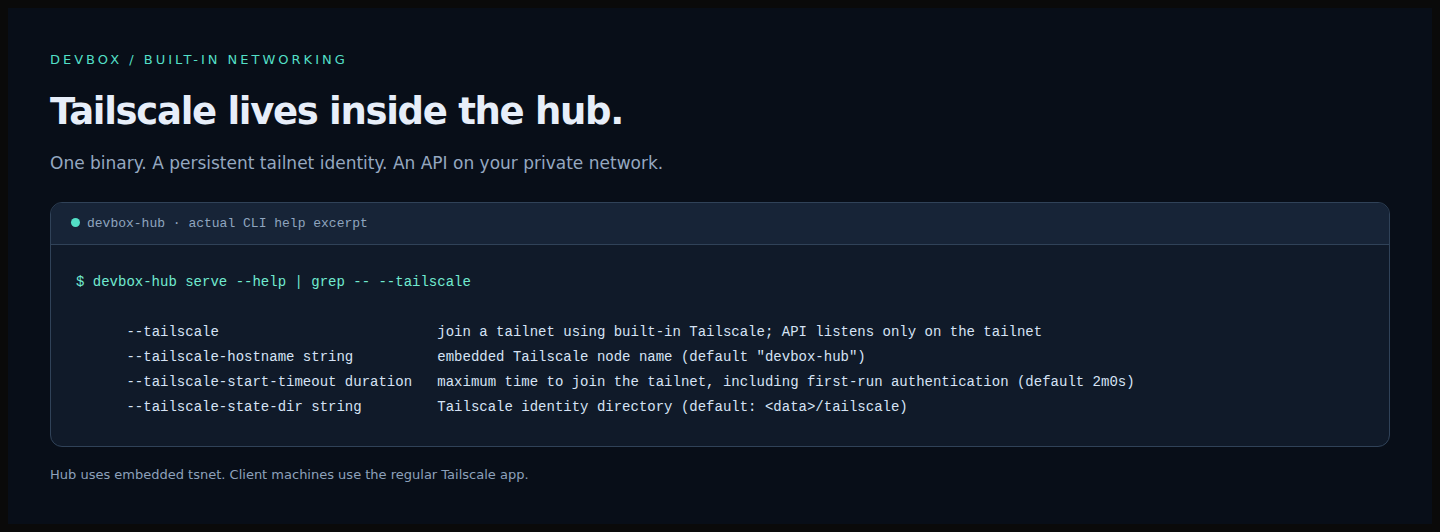
Actual CLI help, rendered for readability. The hub joins the tailnet itself.
On first launch, open the authentication URL printed in the terminal. Once connected, the hub prints its private endpoint:
http://devbox-hub.<your-tailnet>.ts.net:8080
The http:// endpoint travels inside Tailscale's encrypted network. Embedded
mode exposes the hub API only through its Tailscale node; it does not also open
the API port on your machine's LAN or public interfaces. Tailnet access rules
still apply, and devbox's own join tokens and bearer authentication remain required.
This release embeds Tailscale in the hub. Client machines need the regular
Tailscale app, connected to a tailnet that can reach the hub. The devbox client
uses the private URL through that connection. Embedded client networking is not
included in this release. The embedded hub is a separate Tailscale device, even
if its host machine already runs Tailscale.
🤖 Built-in MCP for agents
New in v2.2.0: connect your coding agent directly to devbox with the built-in Model Context Protocol server. It ships in the same client binary:
codex mcp add devbox -- /absolute/path/to/devbox mcp
Or configure any agent that accepts mcpServers JSON:
{
  "mcpServers": {
    "devbox": {
      "command": "/absolute/path/to/devbox",
      "args": ["mcp"]
    }
  }
}
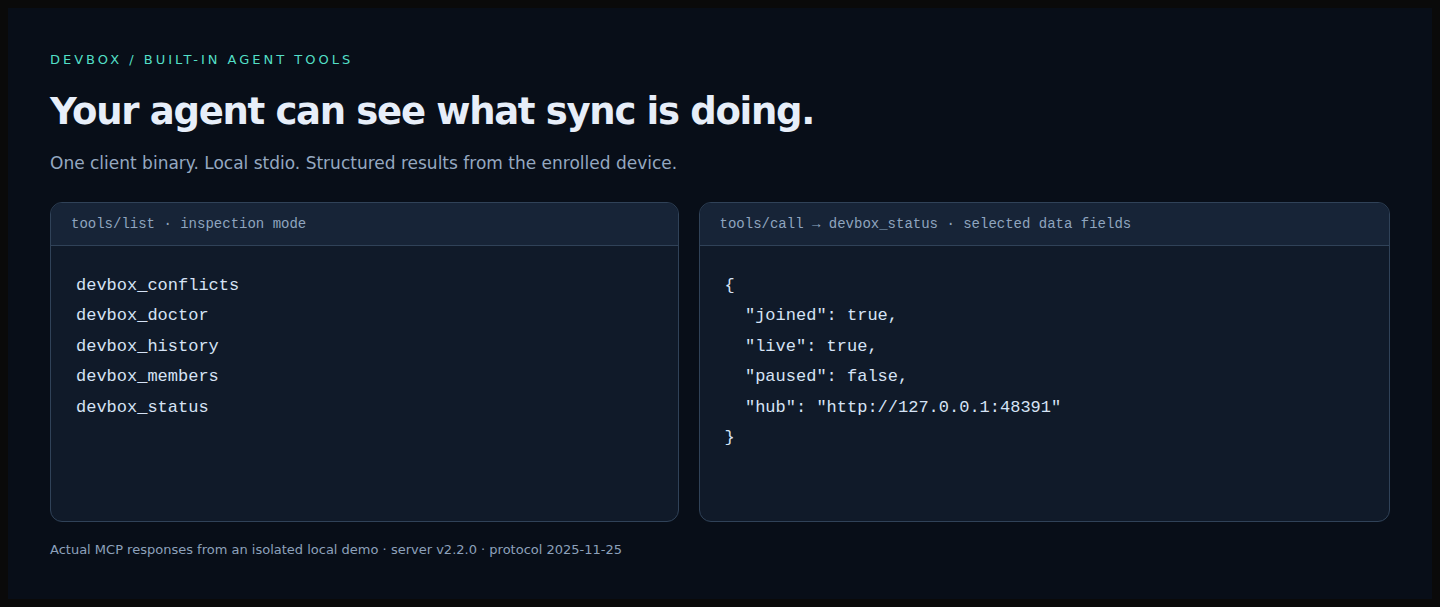
Captured from the built-in stdio server using an isolated enrolled device.
Ask your agent to check sync status, diagnose a failing mount, inspect history,
or list conflicts. Default tools inspect the existing enrolled device.
--allow-writes enables pause/resume, publish, and mount;
--allow-writes --allow-destructive additionally enables restore, deploy, and
unmount. Tools use the CLI's authentication and conflict behavior.
Tailscale connects your machines; MCP connects your agent. The hub embeds Tailscale, client machines use their regular Tailscale connection, and the MCP server talks locally over stdio. No extra MCP service or Node runtime is needed.
flowchart LR
    Agent["AI coding agent"] -->|"local stdio"| MCP["devbox mcp"]
    MCP --> Client["Enrolled devbox client"]
    Client -->|"regular Tailscale app"| Hub["Hub with embedded Tailscale"]
Mozilla AI integration, native Go: v2.3.0 ships an optional
devbox-mcpd-plugin built with Mozilla's official Go plugin SDK. It records
tool-request metadata without logging arguments or file contents. Use the
tested mcpd setup to enable it alongside devbox's
built-in MCP server; Go and PHP plugins share mcpd's middleware protocol.
Read the MCP setup guide for tool names, configuration, execution limits, and errors, or the implementation plan for scope.
✨ Why devbox?
Git records the work you choose to commit. devbox continuously mirrors the working files you are editing across your machines, including uncommitted work.
- Live, bidirectional sync. A filesystem watcher sends changes; peers receive them through a persistent event stream. Periodic rescans catch missed events.
- Developer-friendly filtering.
.devignoreuses gitignore syntax. Optional default ignores skip caches, dependencies, and build output. - Secret guard. Default deny patterns block
.envfiles, private keys, and credential paths independently of.devignore; add your own patterns too. - Conflict copies. Concurrent edits preserve losing file versions as
.conflict-*copies instead of silently discarding them. - Efficient transfers. FastCDC chunking, BLAKE3 content addressing, deduplication, optional gzip, and bandwidth caps reduce repeated uploads.
- Selective mounts. Mount a whole share or one subdirectory, read-write or read-only. Per-device exclusions keep local choices local.
- Snapshots and deployment. Browse history, restore a file or tree, or pin a mount to a snapshot for a deployment.
- Hooks and visibility. Run lifecycle hooks, inspect JSON status, diagnose
problems with
doctor, and enable the hub's built-in live dashboard.
⚡ Install
Linux / macOS client:
curl -fsSL https://git.shoemoney.ai/shoemoney/devbox-dist/releases/download/latest/install.sh | sh
Install the hub as well:
curl -fsSL https://git.shoemoney.ai/shoemoney/devbox-dist/releases/download/latest/install.sh -o install.sh
sh install.sh --hub --no-service
For the optional native Mozilla mcpd plugin (v2.3.0+), run
sh install.sh --mcpd-plugin --no-service; see the
mcpd guide for registration.
--service installs a keep-alive service for the client sync daemon. Run the
hub separately, or configure its own service with the serve arguments below.
Windows (PowerShell):
irm https://git.shoemoney.ai/shoemoney/devbox-dist/releases/download/latest/install.ps1 | iex
Download from GitHub Releases or
the Forgejo distribution mirror.
Both are public. Release downloads include devbox and devbox-hub for Linux amd64/arm64/arm,
macOS amd64/arm64, and Windows amd64, plus SHA256SUMS. The shell installer
supports amd64 and arm64; download the Linux arm binaries directly for 32-bit Pi OS.
The optional devbox-mcpd-plugin has matching platform binaries.
Use --release-url / DEVBOX_RELEASE_URL to select a versioned release.
🛠️ Unreleased shell installer behavior: in the source checkout, --bin-dir DIR
or DEVBOX_BIN_DIR treats the destination literally, expanding only a leading
~/ to the home directory. Quote the value so your calling shell preserves spaces,
$ signs, and backticks; the installer does not evaluate them. For example:
sh ./install.sh --bin-dir '~/tools with spaces/bin' --no-service.
This fix is not yet in the release-hosted installer linked above.
🚀 Tailscale quick start
1. Start your private hub
devbox-hub serve --data ./hub-data --tailscale --tailscale-hostname devbox-hub
Authenticate using the terminal's login URL. The default startup deadline is two
minutes; allow longer with --tailscale-start-timeout 5m if needed. Keep the hub
running and use another terminal for administrative commands.
For unattended first enrollment, set TS_AUTHKEY in the service environment
or a protected environment file. Do not commit it or put it in command-line
arguments. Once enrolled, the persisted state reconnects without the auth key.
The embedded node stores its identity under <data>/tailscale, with a private
state directory. Keep this directory across upgrades and include it in protected
filesystem backups. Do not share one state directory between running hub processes
or clone the same node identity onto multiple hosts. devbox-hub backup backs up
the hub database and blobs; separately preserve the Tailscale state directory.
2. Enroll the first client
On the hub machine, mint a one-time token:
devbox-hub token --data ./hub-data
On your client, connect the Tailscale app, then use the endpoint printed by the hub:
devbox join http://devbox-hub.<your-tailnet>.ts.net:8080 <join-token>
devbox publish ~/Projects projects
devbox start
The hostname is an example: Tailscale may assign a different name when a device with that name already exists. Use the actual printed endpoint. MagicDNS must be available on clients to use its hostname; the hub's Tailscale IP works too.
3. Mount it on another machine
Mint a new token on the hub, connect that machine's Tailscale app, then:
devbox join http://devbox-hub.<your-tailnet>.ts.net:8080 <another-join-token>
devbox mount projects ~/Projects
devbox start
For a subdirectory or read-only checkout:
devbox mount projects/my-app ~/work/my-app
devbox mount projects ~/mirror --ro
Run devbox doctor if the connection fails. Check that the hub is running, the
client is connected to Tailscale, and tailnet policy allows its connection to
port 8080. A Tailscale login does not replace a devbox join token.
Tailscale options
| Hub flag | Default | Purpose |
|---|---|---|
--tailscale |
off | Enable the embedded, tailnet-only API listener |
--tailscale-hostname |
devbox-hub |
Requested name for this Tailscale node |
--tailscale-state-dir |
<data>/tailscale |
Persistent Tailscale identity directory |
--tailscale-start-timeout |
2m |
Maximum time to connect and authenticate |
--listen |
:8080 |
API port; in embedded mode use :PORT |
Tailscale mode accepts a wildcard listen address and serves that port on its own
node only. An explicit host such as 127.0.0.1:8080 is rejected instead of being
silently overridden. The optional dashboard remains a separate host listener
(default 127.0.0.1:8099); --tailscale does not publish it to the tailnet.
🌐 Regular networking
Tailscale is opt-in. Existing LAN and reverse-proxy deployments keep working:
devbox-hub serve --data ./hub-data --listen 127.0.0.1:8088
# Configure your TLS proxy to reach 127.0.0.1:8088, then:
devbox join https://hub.example.com <join-token>
The ordinary listener speaks plain HTTP. Use a TLS reverse proxy when traffic
crosses an untrusted network. Allow large uploads, disable proxy buffering, and
allow long-lived responses for /v1/events (SSE).
The repository's docker-compose.yml runs the ordinary LAN listener. For an
embedded Tailscale container, use the built image with a persistent /data
volume and command serve --data /data --tailscale --listen :8088; no published
API port or /dev/net/tun is needed. Supply TS_AUTHKEY securely on first run
or authenticate through the container logs. The ordinary Compose healthcheck
probes the host-network API, so it must be replaced for tailnet-only mode.
🧰 Commands
| Client command | Purpose |
|---|---|
devbox mcp |
Serve structured agent tools over local stdio |
devbox setup |
Interactive first-run setup |
devbox join <hub> <token> |
Enroll this device |
devbox publish <localdir> <share> |
Create a share and push its files |
devbox mount <share[/subpath]> <localdir> |
Mount and pull a share |
devbox unmount <share> |
Remove a local mount |
devbox start / stop |
Run or stop the sync daemon |
devbox pause / resume |
Pause or resume daemon sync |
devbox status --json |
Inspect device and mount status |
devbox doctor --json |
Diagnose config, connection, and filesystem issues |
devbox log <share> |
List snapshots |
devbox restore <share> <snapshot> [path] |
Restore a file or share |
devbox deploy <share> <snapshot> |
Pin a mount to a snapshot |
devbox conflicts |
List conflict copies |
devbox ignore <pattern> |
Add an ignore pattern |
devbox hook list <share> |
Inspect lifecycle hooks |
devbox invite <share> <principal> <role> |
Invite a member with a per-share role |
devbox members <share> |
List memberships |
Hub administration includes token, readonly, revoke, member, principal,
share ls, device ls, backup, fsck, and gc. Run <command> --help for
arguments. Memberships support viewer, editor, admin, and owner roles; this
release's membership layer enforces writes. Read-side ACL enforcement remains
planned, so use a hub for a trusted group rather than mutually untrusted tenants.
📊 Built-in dashboard
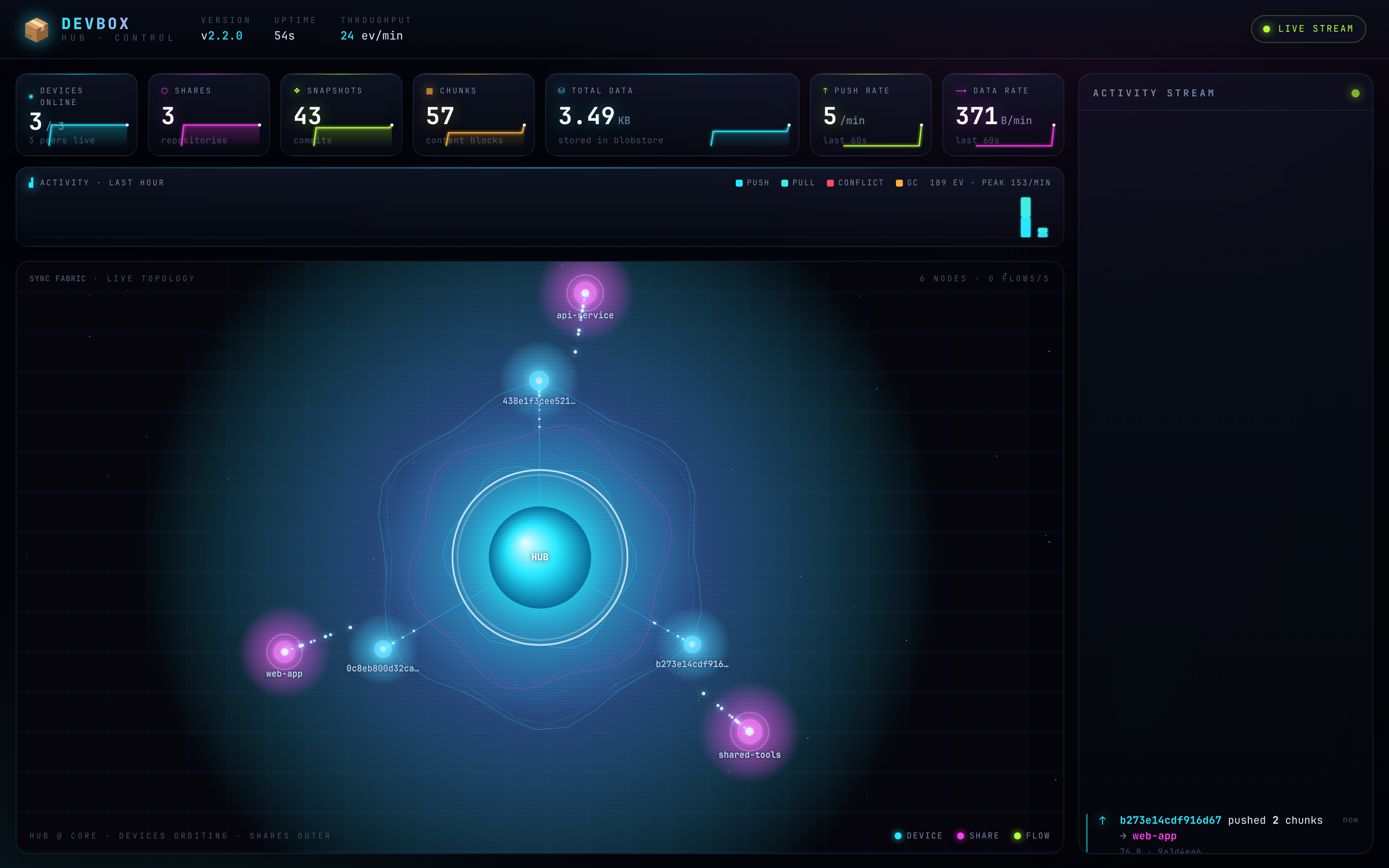
Live hub dashboard with isolated demo data. The capture uses a local hub; it is not evidence of production Tailscale enrollment.
devbox-hub serve --data ./hub-data --tailscale --dashboard
# Dashboard: http://127.0.0.1:8099 on the hub host
The dashboard shows devices, shares, transfers, and conflicts. It is optional,
separate from the API, and local by default. Use --dashboard-token when exposing
it beyond loopback. /healthz, /readyz, and Prometheus /metrics are available
on the API listener; --metrics-token can restrict metrics access.
⚙️ Configuration
Machine configuration lives at $XDG_CONFIG_HOME/devbox, otherwise
~/.config/devbox on Linux/macOS or %AppData%\devbox on Windows.
daemon.toml holds enrollment and mounts; config.toml holds tunables:
[transfer]
max_kbps = 0
compress = true

[sync]
rescan_seconds = 60
ignore_defaults = true

[secrets]
extra_patterns = ["*.secret", "vault-*"]
.devignore filters a share. Device-local mount exclusions avoid syncing a path
on one machine without changing peers. Secret filtering is independent of both.
Hooks support pre/post push and pull plus conflict events; a pre-hook can veto
an operation. The hook runner requires bash (or PowerShell for .ps1 hooks).
On macOS, grant the devbox binary Full Disk Access when syncing protected
folders such as Desktop, Documents, Downloads, or iCloud. devbox doctor checks
mount access and reports failures.
🛡️ Data and upgrades
Devices have Ed25519 identities and prove possession during enrollment. The hub stores bearer-token hashes; downloaded chunks and manifests are checked against their content hashes. Incoming paths are checked for mount containment, and atomic file replacement uses fsync for durability.
Keep backups of the hub's data and identity. deploy/redeploy-hub.sh provides a
gated upgrade flow: migration check on a copy, isolated auth smoke, backup,
binary replacement, live verification, and rollback on failure. Review its host
settings before running it. For embedded mode, preserve the Tailscale directory
and the hub service's --tailscale arguments during upgrades.
🏗️ Build and release
Building the current embedded hub requires Go 1.27.4 or newer, matching the pinned Tailscale dependency. Downloading prebuilt binaries needs no Go toolchain.
go build ./cmd/devbox ./cmd/devbox-hub
go vet ./...
go test -race ./...
VERSION=v2.3.0 ./scripts/build-release.sh
The release script cross-compiles the client, hub, and optional mcpd plugin for six platform/architecture
combinations and generates checksums. Public binaries are available through
GitHub Releases and the Forgejo
devbox-dist mirror. The default
installer uses Forgejo; --release-url can select either host.
Design documents: original sync design and v2 roadmap. Future work includes embedded client networking, read-side ACLs, client-side encryption, and peer chunk exchange. Tailscale transport encryption protects the connection; it does not encrypt stored hub files or replace end-to-end file encryption.
⚖️ License
The hub and client are licensed under AGPLv3. Self-host the core for free. See dependency licenses for third-party components, including Tailscale.