docs: ship illustrated MCP and Tailscale guides for v2.2.0
Some checks are pending
CI / vet-build-test (push) Waiting to run
Some checks are pending
CI / vet-build-test (push) Waiting to run
This commit is contained in:

parent
9f28f979d6
commit
0664591b57
8 changed files with 317 additions and 5 deletions
64
README.md
64
README.md
|
|
@ -2,14 +2,14 @@
|
||||||
|
|
||||||
# 📦 devbox
|
# 📦 devbox
|
||||||
|
|
||||||
### Your working tree, everywhere. Now with built-in Tailscale. 🔒
|
### Your working tree, everywhere. Built-in Tailscale. Built-in MCP. 🔒
|
||||||
|
|
||||||
Continuous file sync for developers: private networking, selective mounts,
|
Continuous file sync for developers: private networking, selective mounts,
|
||||||
conflict copies, snapshot history, and a secret guard that keeps credentials home.
|
conflict copies, snapshot history, and structured tools for your AI coding agent.
|
||||||
|
|
||||||
**Linux · macOS · Windows · Raspberry Pi**
|
**Linux · macOS · Windows · Raspberry Pi**
|
||||||
|
|
||||||
[Install](#-install) · [Tailscale quick start](#-tailscale-quick-start) · [Commands](#-commands) · [Configuration](#-configuration) · [Build](#-build-and-release)
|
[Install](#-install) · [Tailscale quick start](#-tailscale-quick-start) · [Agent MCP](#-built-in-mcp-for-agents) · [Commands](#-commands) · [Configuration](#-configuration) · [Build](#-build-and-release)
|
||||||
|
|
||||||
</div>
|
</div>
|
||||||
|
|
||||||
|
|
@ -26,6 +26,10 @@ router port forwarding, or reverse proxy is required for this mode.
|
||||||
devbox-hub serve --data ./hub-data --tailscale --tailscale-hostname devbox-hub
|
devbox-hub serve --data ./hub-data --tailscale --tailscale-hostname devbox-hub
|
||||||
```
|
```
|
||||||
|
|
||||||
|

|
||||||
|
|
||||||
|
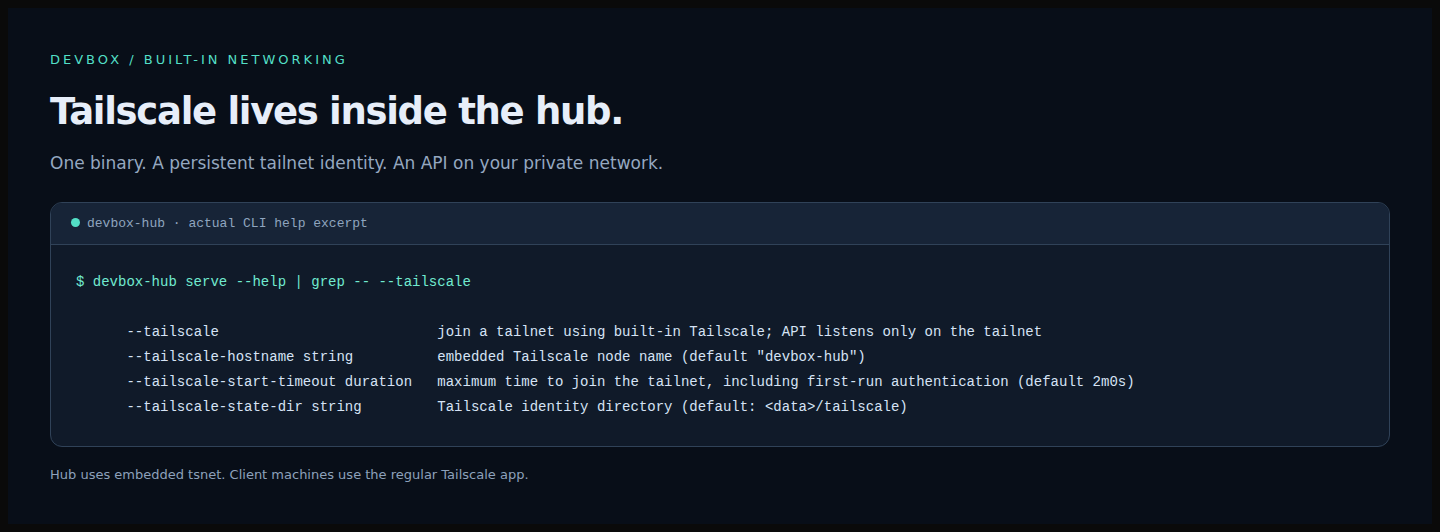
*Actual CLI help, rendered for readability. The hub joins the tailnet itself.*
|
||||||
|
|
||||||
On first launch, open the authentication URL printed in the terminal. Once
|
On first launch, open the authentication URL printed in the terminal. Once
|
||||||
connected, the hub prints its private endpoint:
|
connected, the hub prints its private endpoint:
|
||||||
|
|
||||||
|
|
@ -44,6 +48,52 @@ uses the private URL through that connection. Embedded client networking is not
|
||||||
included in this release. The embedded hub is a separate Tailscale device, even
|
included in this release. The embedded hub is a separate Tailscale device, even
|
||||||
if its host machine already runs Tailscale.
|
if its host machine already runs Tailscale.
|
||||||
|
|
||||||
|
## 🤖 Built-in MCP for agents
|
||||||
|
|
||||||
|
**New in v2.2.0:** connect your coding agent directly to devbox with the built-in
|
||||||
|
Model Context Protocol server. It ships in the same client binary:
|
||||||
|
|
||||||
|
```bash
|
||||||
|
codex mcp add devbox -- /absolute/path/to/devbox mcp
|
||||||
|
```
|
||||||
|
|
||||||
|
Or configure any agent that accepts `mcpServers` JSON:
|
||||||
|
|
||||||
|
```json
|
||||||
|
{
|
||||||
|
"mcpServers": {
|
||||||
|
"devbox": {
|
||||||
|
"command": "/absolute/path/to/devbox",
|
||||||
|
"args": ["mcp"]
|
||||||
|
}
|
||||||
|
}
|
||||||
|
}
|
||||||
|
```
|
||||||
|
|
||||||
|

|
||||||
|
|
||||||
|
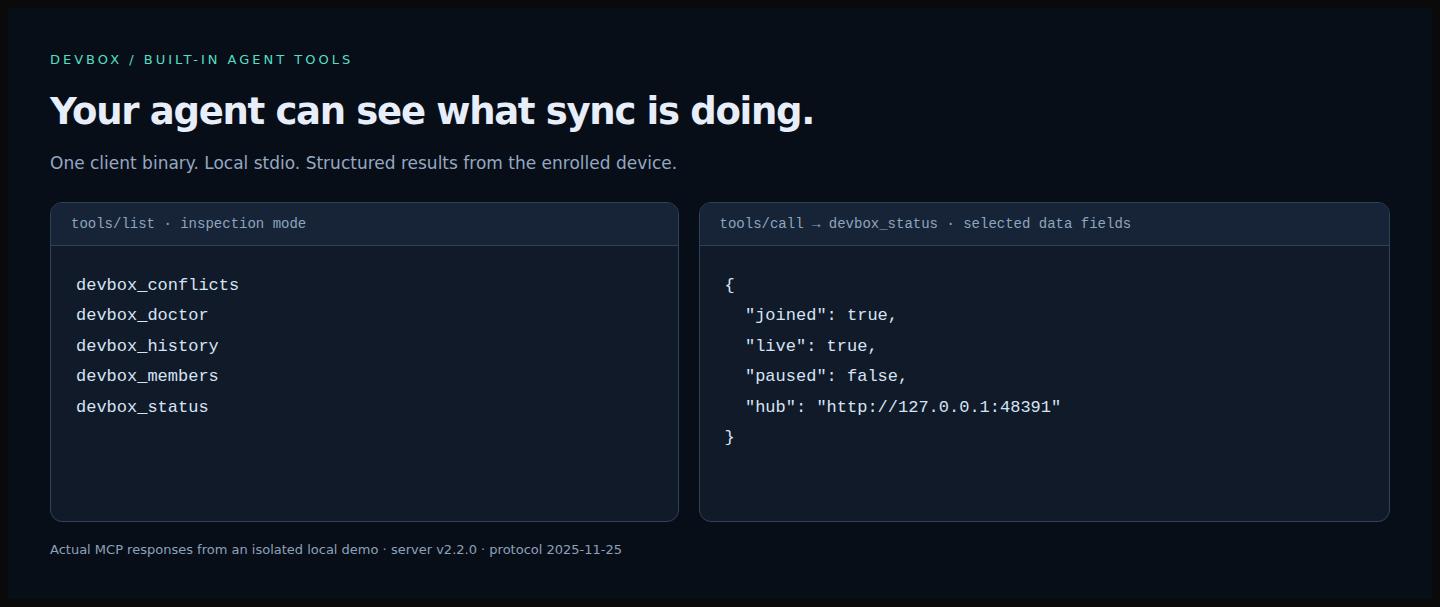
*Captured from the built-in stdio server using an isolated enrolled device.*
|
||||||
|
|
||||||
|
Ask your agent to check sync status, diagnose a failing mount, inspect history,
|
||||||
|
or list conflicts. Default tools inspect the existing enrolled device.
|
||||||
|
`--allow-writes` enables pause/resume, publish, and mount;
|
||||||
|
`--allow-writes --allow-destructive` additionally enables restore, deploy, and
|
||||||
|
unmount. Tools use the CLI's authentication and conflict behavior.
|
||||||
|
|
||||||
|
**Tailscale connects your machines; MCP connects your agent.** The hub embeds
|
||||||
|
Tailscale, client machines use their regular Tailscale connection, and the MCP
|
||||||
|
server talks locally over stdio. No extra MCP service or Node runtime is needed.
|
||||||
|
|
||||||
|
```mermaid
|
||||||
|
flowchart LR
|
||||||
|
Agent["AI coding agent"] -->|"local stdio"| MCP["devbox mcp"]
|
||||||
|
MCP --> Client["Enrolled devbox client"]
|
||||||
|
Client -->|"regular Tailscale app"| Hub["Hub with embedded Tailscale"]
|
||||||
|
```
|
||||||
|
|
||||||
|
Read the [MCP setup guide](docs/MCP.md) for tool names, configuration, execution
|
||||||
|
limits, and errors, or the [implementation plan](docs/MCP-PLAN.md) for scope.
|
||||||
|
|
||||||
## ✨ Why devbox?
|
## ✨ Why devbox?
|
||||||
|
|
||||||
Git records the work you choose to commit. devbox continuously mirrors the
|
Git records the work you choose to commit. devbox continuously mirrors the
|
||||||
|
|
@ -200,6 +250,7 @@ probes the host-network API, so it must be replaced for tailnet-only mode.
|
||||||
|
|
||||||
| Client command | Purpose |
|
| Client command | Purpose |
|
||||||
|---|---|
|
|---|---|
|
||||||
|
| `devbox mcp` | Serve structured agent tools over local stdio |
|
||||||
| `devbox setup` | Interactive first-run setup |
|
| `devbox setup` | Interactive first-run setup |
|
||||||
| `devbox join <hub> <token>` | Enroll this device |
|
| `devbox join <hub> <token>` | Enroll this device |
|
||||||
| `devbox publish <localdir> <share>` | Create a share and push its files |
|
| `devbox publish <localdir> <share>` | Create a share and push its files |
|
||||||
|
|
@ -226,7 +277,10 @@ planned, so use a hub for a trusted group rather than mutually untrusted tenants
|
||||||
|
|
||||||
## 📊 Built-in dashboard
|
## 📊 Built-in dashboard
|
||||||
|
|
||||||
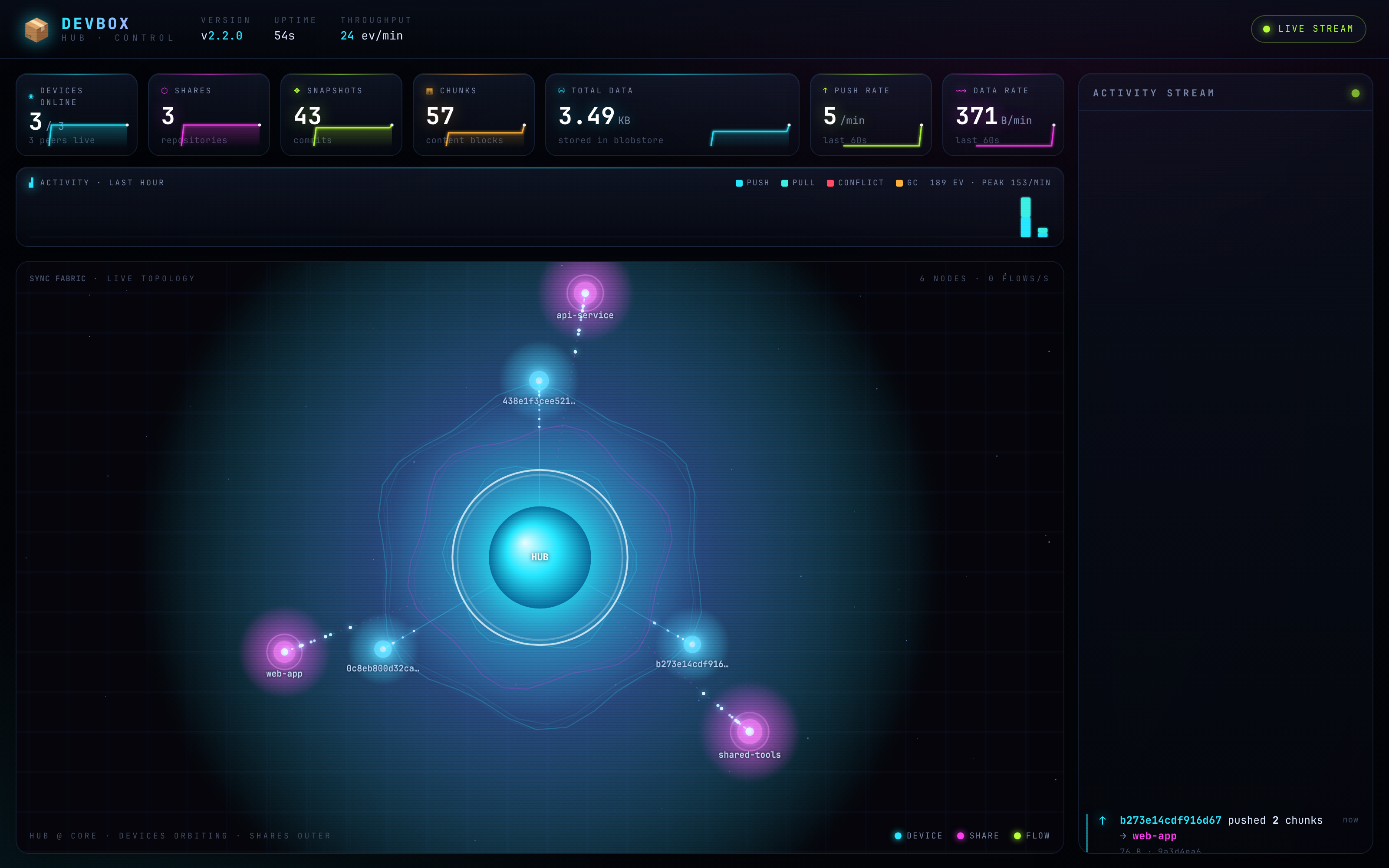
<p align="center"><img src="docs/images/dashboard.png" alt="devbox live sync dashboard" width="860"></p>
|
<p align="center"><img src="docs/images/dashboard.png" alt="Live devbox dashboard showing three devices and three demo shares" width="1000"></p>
|
||||||
|
|
||||||
|
*Live hub dashboard with isolated demo data. The capture uses a local hub; it is
|
||||||
|
not evidence of production Tailscale enrollment.*
|
||||||
|
|
||||||
```bash
|
```bash
|
||||||
devbox-hub serve --data ./hub-data --tailscale --dashboard
|
devbox-hub serve --data ./hub-data --tailscale --dashboard
|
||||||
|
|
@ -288,7 +342,7 @@ pinned Tailscale dependency. Downloading prebuilt binaries needs no Go toolchain
|
||||||
go build ./cmd/devbox ./cmd/devbox-hub
|
go build ./cmd/devbox ./cmd/devbox-hub
|
||||||
go vet ./...
|
go vet ./...
|
||||||
go test -race ./...
|
go test -race ./...
|
||||||
VERSION=v2.1.0 ./scripts/build-release.sh
|
VERSION=v2.2.0 ./scripts/build-release.sh
|
||||||
```
|
```
|
||||||
|
|
||||||
The release script cross-compiles both binaries for six platform/architecture
|
The release script cross-compiles both binaries for six platform/architecture
|
||||||
|
|
|
||||||
135
docs/MCP.md
Normal file
135
docs/MCP.md
Normal file
|
|
@ -0,0 +1,135 @@
|
||||||
|
# Use devbox from an AI agent
|
||||||
|
|
||||||
|
`devbox mcp` runs a Model Context Protocol server over stdin/stdout, built into
|
||||||
|
the devbox client binary. It gives local agents structured access to the same
|
||||||
|
device, mounts, and hub that the CLI uses. No separate MCP package, Node runtime,
|
||||||
|
or additional network listener is required.
|
||||||
|
|
||||||
|

|
||||||
|
|
||||||
|
## Connect your device first
|
||||||
|
|
||||||
|
Enroll with `devbox setup` or `devbox join`, and configure mounts through the
|
||||||
|
CLI. Start the sync daemon separately with `devbox start`. The MCP process
|
||||||
|
inherits the launching user's config directory; `XDG_CONFIG_HOME` can select a
|
||||||
|
different one. It does not ask for a join token through a tool.
|
||||||
|
|
||||||
|
For a Tailscale hub, connect the client machine's regular Tailscale app. Your
|
||||||
|
hub runs embedded Tailscale with `devbox-hub serve --tailscale`; MCP tools use the
|
||||||
|
private hub URL already stored by `devbox join`. MCP itself remains local stdio.
|
||||||
|
|
||||||
|
## Add it to an agent
|
||||||
|
|
||||||
|
Use the absolute path to the installed **file-sync devbox executable**. If you
|
||||||
|
also have a fleet administration command named `devbox`, do not point the agent
|
||||||
|
at that script.
|
||||||
|
|
||||||
|
### Codex
|
||||||
|
|
||||||
|
```bash
|
||||||
|
codex mcp add devbox -- /absolute/path/to/devbox mcp
|
||||||
|
```
|
||||||
|
|
||||||
|
For a separate devbox configuration:
|
||||||
|
|
||||||
|
```bash
|
||||||
|
codex mcp add devbox --env XDG_CONFIG_HOME=/absolute/path/to/config-base -- /absolute/path/to/devbox mcp
|
||||||
|
```
|
||||||
|
|
||||||
|
Equivalent TOML:
|
||||||
|
|
||||||
|
```toml
|
||||||
|
[mcp_servers.devbox]
|
||||||
|
command = "/absolute/path/to/devbox"
|
||||||
|
args = ["mcp"]
|
||||||
|
```
|
||||||
|
|
||||||
|
### Clients using `mcpServers` JSON
|
||||||
|
|
||||||
|
```json
|
||||||
|
{
|
||||||
|
"mcpServers": {
|
||||||
|
"devbox": {
|
||||||
|
"command": "/absolute/path/to/devbox",
|
||||||
|
"args": ["mcp"]
|
||||||
|
}
|
||||||
|
}
|
||||||
|
}
|
||||||
|
```
|
||||||
|
|
||||||
|
Use the MCP configuration location supported by your agent. On Windows, select
|
||||||
|
the absolute path to `devbox.exe`. Restart or reconnect the agent after adding
|
||||||
|
the server.
|
||||||
|
|
||||||
|
## Available tools
|
||||||
|
|
||||||
|
The default server exposes inspection tools only:
|
||||||
|
|
||||||
|
| Tool | Purpose |
|
||||||
|
|---|---|
|
||||||
|
| `devbox_status` | Joined state, hub, configured mounts, and live daemon state when available |
|
||||||
|
| `devbox_doctor` | Structured configuration, hub, filesystem, and watcher diagnostics |
|
||||||
|
| `devbox_conflicts` | List conflict copies without deleting them |
|
||||||
|
| `devbox_history` | Bounded snapshot history for a share |
|
||||||
|
| `devbox_members` | Membership information for a share |
|
||||||
|
|
||||||
|
To allow sync operations, set `args` to `["mcp", "--allow-writes"]`:
|
||||||
|
|
||||||
|
| Additional tool | Purpose |
|
||||||
|
|---|---|
|
||||||
|
| `devbox_pause` | Pause the running sync daemon |
|
||||||
|
| `devbox_resume` | Resume the running sync daemon |
|
||||||
|
| `devbox_publish` | Create a share from a local directory and push its files |
|
||||||
|
| `devbox_mount` | Mount a share or subdirectory, optionally read-only |
|
||||||
|
|
||||||
|
To also allow restore, deployment, and unmounting, use
|
||||||
|
`["mcp", "--allow-writes", "--allow-destructive"]`:
|
||||||
|
|
||||||
|
| Additional tool | Purpose |
|
||||||
|
|---|---|
|
||||||
|
| `devbox_restore` | Restore a snapshot or selected path |
|
||||||
|
| `devbox_deploy` | Apply a snapshot and pin the local mount |
|
||||||
|
| `devbox_unmount` | Remove a mount from configuration |
|
||||||
|
|
||||||
|
`devbox_mount` may merge local files, push changes, replace its mount config,
|
||||||
|
and clear a deployment pin. It is available with `--allow-writes` and advertises
|
||||||
|
`destructiveHint: true`; set `read_only: true` for a pull-only mount. Publish and
|
||||||
|
mount require an absolute `local_dir`; shell expansions such as `~` are not
|
||||||
|
performed. Snapshot IDs must be the full lowercase 64-character value from
|
||||||
|
history.
|
||||||
|
|
||||||
|
Unavailable tools are omitted from discovery. `--allow-destructive` requires
|
||||||
|
`--allow-writes`. Tool descriptions and schemas specify the exact parameters.
|
||||||
|
Use tool discovery rather than guessing arguments.
|
||||||
|
|
||||||
|
## Results and failures
|
||||||
|
|
||||||
|
Tools return structured results with the underlying command's output. A failed
|
||||||
|
operation is marked as an MCP tool error, including failed doctor checks; an
|
||||||
|
agent should inspect the diagnostic result before taking another action.
|
||||||
|
|
||||||
|
The command timeout defaults to `2m` and includes time waiting for another tool
|
||||||
|
call in this server. Set a positive `--command-timeout`, for example
|
||||||
|
`["mcp", "--command-timeout", "5m"]`, for large transfers. Captured stdout is
|
||||||
|
limited to 1 MiB and stderr to 64 KiB; `truncated` reports clipping. Results have
|
||||||
|
`stdout`, `stderr`, `exit_code`, `truncated`, optional parsed `data`, and optional
|
||||||
|
`error` fields. History accepts `limit` from 1 to 100 (default 20).
|
||||||
|
|
||||||
|
Calls are serialized within one MCP server. Coordinate mount/config changes
|
||||||
|
across multiple agents or CLI processes. Cancellation stops
|
||||||
|
the child command. An interrupted write may have completed some work already;
|
||||||
|
inspect status and history before retrying. Existing lifecycle hooks and
|
||||||
|
conflict-preservation behavior apply exactly as they do through the CLI.
|
||||||
|
|
||||||
|
MCP stdout contains protocol traffic only. Logs and startup errors go to stderr.
|
||||||
|
The server does not expose the stored bearer token, device private key, arbitrary
|
||||||
|
shell commands, or conflict-copy deletion as tools.
|
||||||
|
|
||||||
|
## Useful agent requests
|
||||||
|
|
||||||
|
- “Check whether this device is joined and whether its sync daemon is running.”
|
||||||
|
- “List conflicts and the latest snapshots for this share; don't change files.”
|
||||||
|
- “Diagnose why this mount isn't syncing and explain the failing checks.”
|
||||||
|
- With writes enabled: “Pause sync while I change dependencies, then resume it.”
|
||||||
|
|
||||||
|
See the [implementation plan](MCP-PLAN.md) for the scope and acceptance checks.
|
||||||
19
docs/images/README.md
Normal file
19
docs/images/README.md
Normal file
|
|
@ -0,0 +1,19 @@
|
||||||
|
# Documentation screenshots
|
||||||
|
|
||||||
|
These images show released CLI output and a running isolated demo. They do not
|
||||||
|
show production data, credentials, or production-tailnet enrollment.
|
||||||
|
|
||||||
|
- `tailscale-help.png`: screenshot of an HTML terminal-style presentation of the
|
||||||
|
actual `devbox-hub serve --help | grep -- --tailscale` output. The presentation
|
||||||
|
adds a title/caption; the flag descriptions are captured from the binary.
|
||||||
|
- `mcp-tools.png`: screenshot of a terminal-style presentation of actual MCP
|
||||||
|
tool discovery and a `devbox_status` result from the built-in stdio server.
|
||||||
|
The server uses an isolated enrolled demo config.
|
||||||
|
- `dashboard.png`: browser screenshot of the live dashboard from a local hub
|
||||||
|
with three demo device identities and shares (`web-app`, `api-service`, and
|
||||||
|
`shared-tools`). Changes are sent through actual sync daemons. The dashboard
|
||||||
|
is separate from the API and is not itself published by `--tailscale`.
|
||||||
|
|
||||||
|
The Tailscale client/server distinction remains the same in every capture:
|
||||||
|
the hub embeds tsnet, client machines use regular Tailscale, and MCP runs over
|
||||||
|
local stdin/stdout in the client binary.
|
||||||

Binary file not shown.
|
Before Width: | Height: | Size: 946 KiB After Width: | Height: | Size: 2.6 MiB |
BIN
docs/images/mcp-tools.png
Normal file
BIN
docs/images/mcp-tools.png
Normal file

Binary file not shown.
|
After Width: | Height: | Size: 62 KiB |
BIN
docs/images/tailscale-help.png
Normal file
BIN
docs/images/tailscale-help.png
Normal file

Binary file not shown.
|
After Width: | Height: | Size: 62 KiB |
45
docs/mcp-evaluation.xml
Normal file
45
docs/mcp-evaluation.xml
Normal file
|
|
@ -0,0 +1,45 @@
|
||||||
|
<evaluation>
|
||||||
|
<!-- Read-only agent evaluation prompts. Launch the documented modes and use
|
||||||
|
tool discovery/schemas, the setup guide, and an isolated enrolled fixture.
|
||||||
|
These prompts are not a claim that an LLM benchmark has been run. -->
|
||||||
|
<qa_pair>
|
||||||
|
<question>Discover the tools in default mode, inspect their annotations, and compare them with the guide. How many tools are available?</question>
|
||||||
|
<answer>5</answer>
|
||||||
|
</qa_pair>
|
||||||
|
<qa_pair>
|
||||||
|
<question>Discover tools in default mode and with --allow-writes. How many additional tools does the write flag enable?</question>
|
||||||
|
<answer>4</answer>
|
||||||
|
</qa_pair>
|
||||||
|
<qa_pair>
|
||||||
|
<question>Compare discovery in all three documented access modes. How many tools are available when both write and destructive flags are enabled?</question>
|
||||||
|
<answer>12</answer>
|
||||||
|
</qa_pair>
|
||||||
|
<qa_pair>
|
||||||
|
<question>Inspect the tools available with --allow-writes and the schemas described in the guide. Can an agent restore a snapshot in this mode without the destructive flag?</question>
|
||||||
|
<answer>no</answer>
|
||||||
|
</qa_pair>
|
||||||
|
<qa_pair>
|
||||||
|
<question>Use status on a fresh unjoined configuration, then inspect the setup guide. What CLI command can enroll the device interactively before MCP uses its hub connection?</question>
|
||||||
|
<answer>devbox setup</answer>
|
||||||
|
</qa_pair>
|
||||||
|
<qa_pair>
|
||||||
|
<question>Discover tools and inspect the schema for conflict inspection. Which tool lists conflict copies without deleting them?</question>
|
||||||
|
<answer>devbox_conflicts</answer>
|
||||||
|
</qa_pair>
|
||||||
|
<qa_pair>
|
||||||
|
<question>Compare the restore and deployment tool descriptions without calling either. Which one applies a snapshot and pins the local mount?</question>
|
||||||
|
<answer>devbox_deploy</answer>
|
||||||
|
</qa_pair>
|
||||||
|
<qa_pair>
|
||||||
|
<question>Use status on an enrolled fixture and compare it with the tool-discovery list. Which history tool can inspect the snapshots for one of its mounted shares without changing files?</question>
|
||||||
|
<answer>devbox_history</answer>
|
||||||
|
</qa_pair>
|
||||||
|
<qa_pair>
|
||||||
|
<question>Inspect the agent launch configuration and the Tailscale setup guide. Does devbox mcp require a remote HTTP MCP listener or communicate through local stdio?</question>
|
||||||
|
<answer>local stdio</answer>
|
||||||
|
</qa_pair>
|
||||||
|
<qa_pair>
|
||||||
|
<question>Compare the Tailscale client setup and MCP launch configuration. Which command starts the embedded Tailscale hub rather than the local agent MCP server?</question>
|
||||||
|
<answer>devbox-hub serve --tailscale</answer>
|
||||||
|
</qa_pair>
|
||||||
|
</evaluation>
|
||||||
59
docs/releases/v2.2.0.md
Normal file
59
docs/releases/v2.2.0.md
Normal file
|
|
@ -0,0 +1,59 @@
|
||||||
|
# v2.2.0 — Built-in MCP + Tailscale
|
||||||
|
|
||||||
|
Your working tree on every machine. Structured sync tools for your coding agent.
|
||||||
|
|
||||||
|
## Tailscale is built into the hub
|
||||||
|
|
||||||
|
```bash
|
||||||
|
devbox-hub serve --data ./hub-data --tailscale --tailscale-hostname devbox-hub
|
||||||
|
```
|
||||||
|
|
||||||
|
The hub joins your tailnet itself, without a separate Tailscale installation,
|
||||||
|
root privileges, TUN device, router port forwarding, or reverse proxy. Enroll
|
||||||
|
using the first-run login URL or a securely supplied `TS_AUTHKEY`; preserve
|
||||||
|
`<data>/tailscale` across upgrades. Clients use the regular Tailscale app and
|
||||||
|
the private endpoint printed by the hub. Devbox join tokens remain required.
|
||||||
|
|
||||||
|
|
||||||
|
|
||||||
|
## MCP is built into the client
|
||||||
|
|
||||||
|
```bash
|
||||||
|
codex mcp add devbox -- /absolute/path/to/devbox mcp
|
||||||
|
```
|
||||||
|
|
||||||
|
The new `devbox mcp` command serves tools over local stdio. Inspect status,
|
||||||
|
diagnostics, conflicts, history, and memberships by default. Enable pause,
|
||||||
|
resume, publish, and mount with `--allow-writes`. Restore, deploy, and unmount
|
||||||
|
also require `--allow-destructive`. The server uses the enrolled device's
|
||||||
|
existing config and connection, including access to Tailscale hubs.
|
||||||
|
|
||||||
|
|
||||||
|
|
||||||
|
See the [MCP guide](https://github.com/shoemoney/devbox/blob/main/docs/MCP.md)
|
||||||
|
for configuration examples and tool details. No separate MCP package or Node
|
||||||
|
runtime is needed. Start the sync daemon separately with `devbox start`.
|
||||||
|
|
||||||
|
## Install
|
||||||
|
|
||||||
|
```bash
|
||||||
|
curl -fsSL https://git.shoemoney.ai/shoemoney/devbox-dist/releases/download/latest/install.sh | sh
|
||||||
|
```
|
||||||
|
|
||||||
|
For the hub too, download the installer and run `sh install.sh --hub --no-service`.
|
||||||
|
Both binaries ship for Linux amd64/arm64/arm, macOS amd64/arm64, and Windows amd64.
|
||||||
|
`SHA256SUMS` covers the 12 binaries and both installers. Public downloads are
|
||||||
|
available on GitHub and Forgejo. Source builds require Go 1.27.4+.
|
||||||
|
|
||||||
|
## Validation
|
||||||
|
|
||||||
|
Passed vet, 189 race tests across 19 packages, and real SDK stdio tests for
|
||||||
|
initialization, discovery, calls, permissions, authenticated hub operations,
|
||||||
|
input validation, cancellation, timeouts, and output caps. The embedded Tailscale
|
||||||
|
regression uses real nodes against an isolated local control/DERP plane; no
|
||||||
|
production-tailnet enrollment is claimed.
|
||||||
|
|
||||||
|
|
||||||
|
|
||||||
|
The dashboard capture uses a local demo hub and real sync daemons. It is not a
|
||||||
|
production-tailnet capture.
|
||||||
Loading…
Reference in a new issue